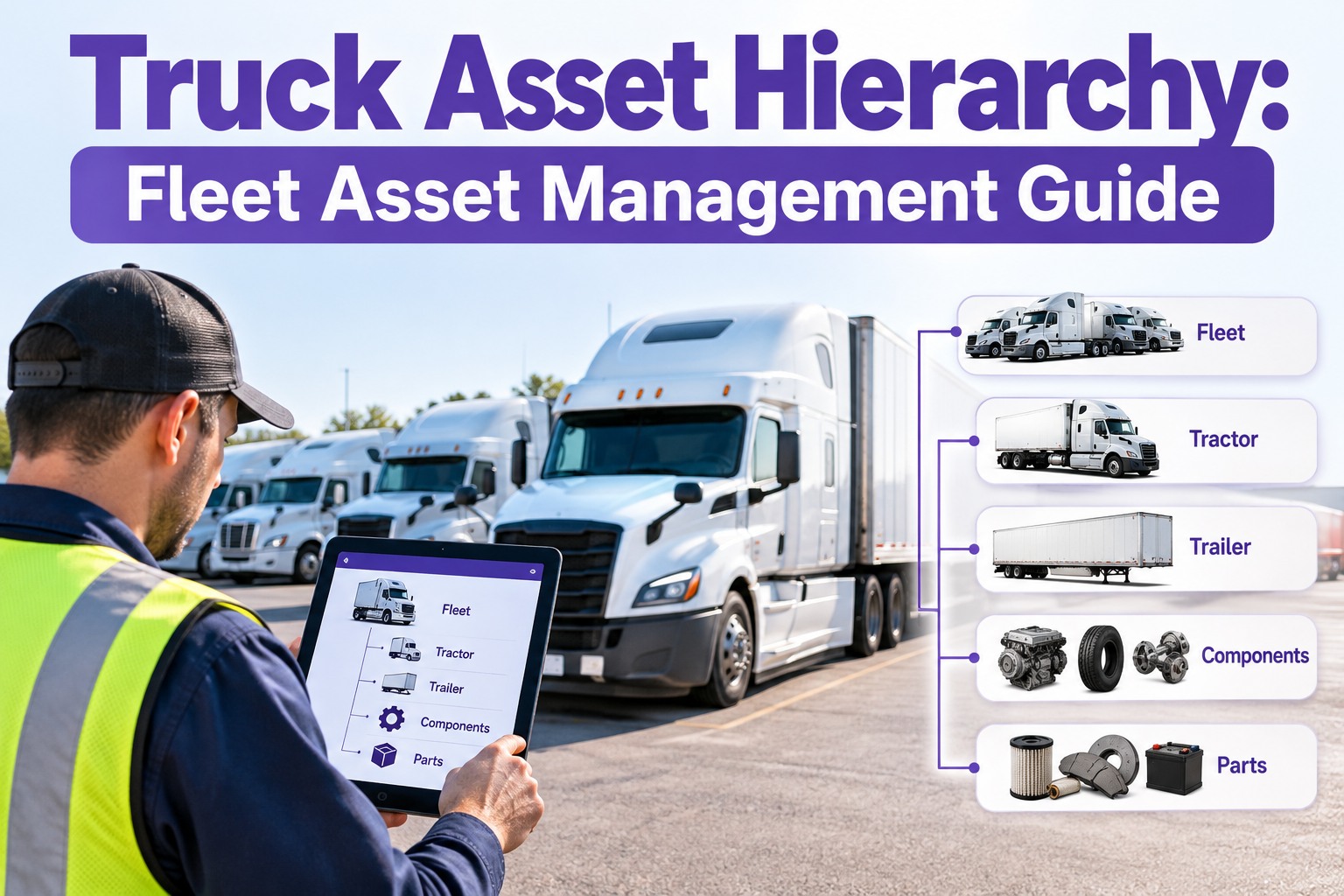
Ask a fleet manager how many trucks they run and you'll get a number in seconds. Ask which tires, batteries and aftertreatment units are on which truck right now, and the answer gets slower. That gap is where maintenance history goes missing, warranty claims get lost and repeat failures hide. A truck asset hierarchy fixes it by organizing your fleet in levels: the fleet, the tractor or trailer, its systems, and the components inside them, so every repair, inspection and part lands on the right record. This guide shows how to structure one, what to track at each level, and how to roll it out without a six-month project. Setup details depend on your fleet mix, so adapt the levels to how your shop actually works. A hierarchy only pays off when it is easy to keep current, which is what Truck Inspection & Maintenance Management Software is built for.
Truck Asset Hierarchy: Fleet Asset Management Guide
Flat unit lists make it hard to see which component failed, which trailer it was on and what it cost. Truck Inspection & Maintenance Management Software lets you organize tractors, trailers and components in a clear hierarchy, then connects inspections, defects, work orders and PM schedules to the right asset automatically.
The Hierarchy at a Glance
Think of it as a tree. Each level answers a different question, and each one rolls up into the level above it. You do not need every level on day one. Start at the top and go as deep as your maintenance actually needs.
What to Track at Each Level
Each level carries different information. Keeping the data at the right level stops records from getting cluttered and makes reports meaningful.
- Unit number, VIN, plate and registration
- Make, model, year and engine type
- Odometer and engine hours
- Assigned driver, terminal and status
- Inspection history and open defects
- Which PM intervals apply to this system
- Defects and work orders by system
- Service history and recurring failures
- Notes from technicians and OEM guidance
- Part number, serial number and supplier
- Install date, mileage or hours at install
- Warranty terms and expiry
- Measurements such as tread or lining thickness
- Where it moved if it was swapped between units
Tractor vs. Trailer: Two Trees, One Fleet
Tractors and trailers wear differently and move independently, so they need their own branches. Pairing happens on the road, not in the record, which is why a trailer's history has to travel with the trailer.
- Engine, transmission, aftertreatment and cooling
- Steering, brakes, axles and suspension
- Electrical, lighting and cab equipment
- Fuel, DEF and fluids
- Miles, engine hours and idle time
- Frame, floor, doors, roof and landing gear
- Brakes, ABS, axles and suspension
- Tires and wheel ends
- Lighting and reflective tape
- Reefer unit, liftgate or other equipment, if fitted
See the Difference: Flat List vs. Hierarchy
The same repair looks very different in each setup. One tells you a truck was fixed. The other tells you what was fixed, where and how often.
- Which axle? Which wheel end?
- Which part was replaced?
- Is this the third time this year?
- Is the part still under warranty?
- Exact position and part number recorded
- Install date and mileage on the component
- Repeat failures visible in one view
- Warranty status checked before paying
Naming Rules That Keep It Clean
A hierarchy is only as good as its naming. Agree on a few rules up front, and the data stays searchable as the fleet grows.
Roll It Out in Four Steps
You do not need a perfect structure to start. Build the top, prove it works, then go deeper where the maintenance cost is.
The Hierarchy Works When Daily Work Feeds It
A tree nobody updates goes stale fast. In Truck Inspection & Maintenance Management Software, every inspection, defect and work order attaches to the unit and system it belongs to, so the hierarchy fills itself in as your drivers and technicians do their jobs. You get a history by unit, trailer and component without a separate data-entry project.
What a Good Hierarchy Lets You Answer
Frequently Asked Questions
Give Every Truck, Trailer and Component a Record That Lasts
Start free and add your first units, or talk to our team about structuring an asset hierarchy that matches how your shop works.