The most expensive fleet software is the one your team refuses to use. Industry surveys consistently put CMMS implementation failure rates between 47% and 80% within the first year — not because the platforms lack features, but because the rollout was treated as software installation instead of operational change. The most common failure signature is identical across every failed deployment: fleet manager buys the platform, IT gets it configured in two weeks, a single training webinar goes out to all users, everybody nods along, and three months later the drivers are still filling out paper DVIRs, the shop is still tracking PMs on the whiteboard, and the "new platform" is used by exactly one person — usually the fleet manager who bought it. The pattern that separates the 20% of fleets that adopt successfully from the 80% that shelfware their new software is not the choice of platform. It is a structured 90-day onboarding sequence that treats data readiness, pilot deployment, and full rollout as three distinct phases, each with named accountability, published KPIs, and a hard rule against advancing until the previous phase hits its adoption threshold. Fleets that follow the sequence reach 85%+ PM compliance within 60 days, close paper DVIRs completely by day 90, and see their maintenance-related unplanned downtime cut 30–50% within the first quarter. Fleets that skip the sequence — go live across every truck on day one with a single training session — hit adoption rates below 40% and eventually cancel the platform. This guide walks through the proven 90-day roadmap week by week, the KPIs to track at 30/60/90-day checkpoints, the RACI stakeholder matrix that keeps ownership clear, the six most common failure modes to avoid, and how the free Truck Inspection & Maintenance app ships with guided onboarding built into the platform from Day 1. Sign up free for up to 3 vehicles or contact our team for a fleet-scale rollout plan.
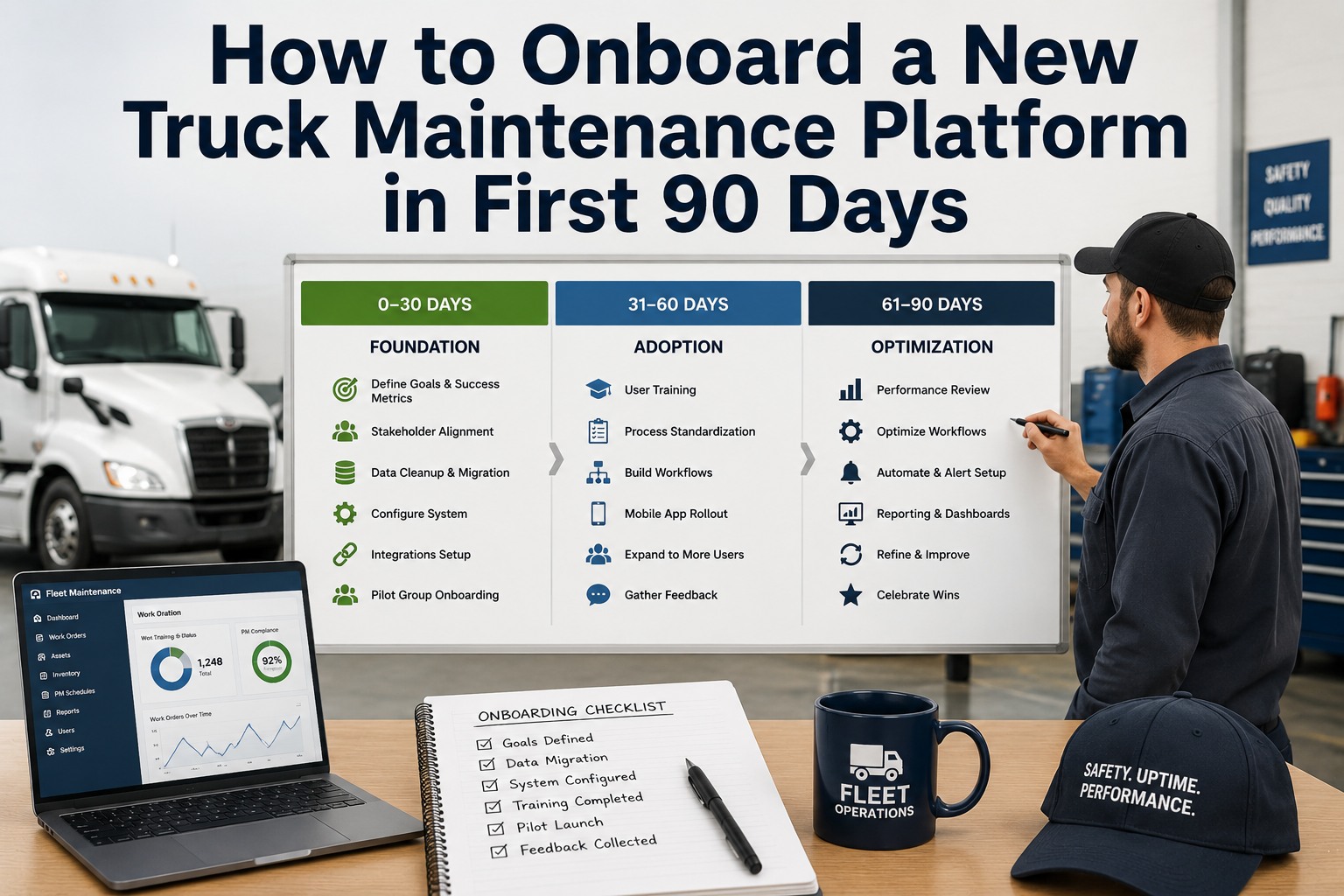
How to Onboard a New Truck Maintenance Platform in the First 90 Days
The proven sequence that separates fleets that adopt from fleets that shelfware — with week-by-week actions, KPIs, and stakeholder ownership.
Why Most Fleet CMMS Rollouts Fail
Before walking through what works, know what doesn't. Industry data from 500+ implementations identifies the same six failure signatures every time — none of them are technology problems:
Poor Data Quality at Migration
Incomplete VIN records, missing service history, duplicate asset entries. Bad data poisons the platform from Day 1 and destroys user trust.
No Executive Sponsor
Zero visible leadership usage. If the maintenance director does not open the platform daily, technicians will not either.
Single Generic Training Session
One 60-minute webinar for drivers, mechanics, and dispatchers combined. Role-specific onboarding gets each user productive 3× faster.
Parallel Paper Systems Persist
Spreadsheets and whiteboards still in use three months after go-live. Parallel systems are the clearest signal the platform was installed, not adopted.
Software "Too Difficult" Perception
Teams find the platform harder than paper. Almost always caused by desktop-first UX bolted onto mobile, or workflows configured by IT instead of shop floor.
Fleet-Wide Day-One Rollout
Going live on 100% of trucks simultaneously turns every problem into an organization-wide fire. Always pilot first — never skip this phase.
Phase 1: Days 1–30 — Foundation
The first 30 days are not about going live. They are about getting the data, configuration, and team accountability right so that Phase 2 (pilot) has something clean to run on:
Kickoff & Team Assignment
- Assign named System Owner (single-point accountability)
- Publish success KPIs — PM compliance rate, DVIR completion, work order cycle time
- Define pilot scope — which 10–20% of vehicles will go first
- Hold executive sponsor briefing; commit to daily platform usage
Data Migration
- Import complete VIN registry — year, make, model, acquisition data
- Import 12–24 months of clean maintenance history
- Set up asset hierarchy: Fleet → Location → Class → Vehicle → Component
- De-duplicate and validate — clean data beats complete data
PM & Workflow Configuration
- Build PM templates by vehicle class with mileage, hours, and calendar triggers
- Configure DVIR checklists aligned to FMCSA 11 component categories
- Wire in telematics + ELD integrations for pilot vehicles
- Test end-to-end: driver submits DVIR → auto-work-order → mechanic queue
Role-Based Training Prep
- Build 3 separate training tracks: driver, mechanic, dispatcher
- Record short (under 5 min) how-to videos for the top 5 workflows per role
- Identify power users in each role — the internal champions
- Set the pilot go-live date; publish across the organization
Phase 2: Days 31–60 — Pilot
Pilot is where the theory meets the shop floor. Run it on a controlled subset — one terminal, one route, one truck class — small enough to coach daily but big enough to expose real workflow gaps before you inflict them on the whole fleet:
Pilot Go-Live
- Role-based training delivered to pilot users — separate sessions per role
- All pilot vehicle DVIRs submitted through platform starting Day 1
- Daily 15-minute stand-up between maintenance and pilot drivers
- Hypercare mode: fastest response times to any user friction
Workflow Refinement
- Log every workflow issue raised by pilot users; fix within 48 hours
- Pair resistant users with power-user mentors for side-by-side work
- Retrain gaps identified at 30-day checkpoint — never assume once was enough
- Measure baseline: DVIR completion, PM compliance, work order cycle time
Kill Paper for Pilot
- Discontinue paper DVIRs and whiteboard tracking for pilot group entirely
- Platform becomes the only way to log work orders and close them
- Track adoption rate — who is logging in, who is not
- Address adoption laggards directly — no exemptions
60-Day Gate Review
- Measure pilot KPIs against baseline; require 85%+ PM compliance
- Interview pilot users: what works, what does not, what would kill adoption at scale
- GO/NO-GO decision — do NOT advance to Phase 3 if pilot KPIs are missed
- Refine training materials with real pilot-user language
Phase 3: Days 61–90 — Scale
Scale is repetition, not reinvention. If Phase 2 hit its KPIs, Phase 3 rolls the same tested workflow out to every truck in the fleet, closing the paper systems permanently:
Wave-Based Rollout Begins
- Expand from pilot to next 25% of fleet — pair with pilot power users as mentors
- Deliver role-based training to next wave — same tracks refined from pilot feedback
- Discontinue paper DVIRs and whiteboards for Wave 2 group on Day 1
- Weekly adoption dashboard published to leadership
Rollout to 75%
- Add Wave 3 — 50% cumulative live on platform
- Wave 1 pilot users continue as internal help desk
- Address adoption gaps at 60-day retraining checkpoint
- Integrations layer — accounting, fuel card feeds now flowing
Full Fleet Live
- Final wave live — 100% of vehicles on platform
- All paper systems officially retired — no parallel tracking permitted
- All work orders required to close through the platform
- Adoption tracked per user; nobody exempt regardless of tenure
90-Day Adoption Lock
- Full 90-day KPI review; publish results across organization
- Retrain any user with less than 4 platform logins per week
- Hand off from onboarding team to ongoing operations owner
- Set 6-month optimization roadmap: advanced features, deeper integrations
The Non-Negotiable Rule — Paper Ends on Go-Live Day
Every failed rollout has one thing in common: paper systems that "temporarily" ran in parallel with the new platform for weeks or months after go-live. There is nothing temporary about it — parallel systems are the clearest signal that the platform was installed but never adopted. Once paper is retired, it must stay retired. Any exemption erodes adoption company-wide within 30 days. The rule is simple and inflexible: paper ends on the day each user group goes live. No exceptions, no laggards, no "just this once."
The KPI Dashboard — What to Measure at 30/60/90 Days
Adoption is not a launch-day event; it decays without reinforcement. Track these six metrics at every checkpoint. If any KPI misses target, retrain the gap before advancing:
Stakeholder RACI — Who Owns What
Every successful rollout has clear ownership. Every failed one has ambiguous ownership. Use this RACI (Responsible / Accountable / Consulted / Informed) matrix to eliminate the "I thought you were doing that" problem:
The 90-day roadmap built into the platform — no consultant required.
Truck Inspection & Maintenance ships with the full 90-day onboarding sequence built into the platform. Guided data migration, PM template library by vehicle class, role-based training tracks for drivers/mechanics/dispatchers, and adoption dashboards that surface who is logging in and who is not — all built in. Free forever for up to 3 vehicles. Create your free account in 10 minutes or talk to our expert team for a fleet-scale rollout plan.
Frequently Asked Questions
Why do most fleet CMMS implementations fail?
Industry surveys of 500+ implementations identify six recurring failure signatures: poor data quality at migration (78%), no executive sponsor (65%), single generic training session (58%), parallel paper systems persisting (47%), software perceived too difficult (33%), and "big bang" fleet-wide rollout on day one. None of these are technology problems — they are all process and sequencing failures. Fleets that follow a structured 90-day sequence with data cleanup in Phase 1, controlled pilot in Phase 2, and wave-based rollout in Phase 3 reach 85%+ PM compliance within 60 days and eliminate paper systems by day 90.
Should we roll out to the whole fleet at once or pilot first?
Always pilot first. Going live across 100% of vehicles simultaneously turns every workflow issue into an organization-wide fire, and every failed adoption becomes a company-wide problem. Pilot on 10–20% of the fleet — one terminal, one route, or one truck class — small enough to coach daily but big enough to expose real workflow gaps. Refine based on pilot feedback, then wave-roll the rest of the fleet in three-week increments. This sequence is why structured 90-day rollouts hit 95%+ compliance rates while big-bang deployments fail nearly half the time.
When should paper systems be retired during the rollout?
Paper ends on the day each user group goes live. No exceptions, no laggards, no "just this once." Every failed rollout has one common failure mode: paper systems that "temporarily" ran in parallel with the new platform for weeks or months after go-live. There is nothing temporary about it — parallel tracking is the clearest signal that the platform was installed but never adopted. For the pilot group, paper retires at Week 7. For each subsequent wave, paper retires on the wave's go-live day. Any exemption erodes adoption company-wide within 30 days.
How do we know if adoption is actually happening?
Track six KPIs at 30, 60, and 90-day checkpoints: PM compliance rate (baseline → 85% → 95%), DVIR completion rate (baseline → 100% pilot → 100% fleet), weekly active users (config team → pilot 100% → all users 4×/week), work order cycle time (baseline → −20% → −40%), paper system usage (in use → pilot eliminated → 0% fleet), and data quality score (95% VIN → 95% PM templates → 95% closed WOs). If any KPI misses target, retrain the gap before advancing. Adoption decays without reinforcement — do not assume one training session is enough.
Who should own the CMMS rollout inside our organization?
Every successful rollout has one named System Owner with single-point accountability for data quality, PM compliance, and platform adoption. Not a job description — an actual name. The System Owner reports to an Executive Sponsor (typically the VP of Maintenance or Fleet Director) who commits to visible daily platform usage. IT/Ops handles the technical configuration under the System Owner's direction. Shop floor mechanics and drivers own the workflow inputs. Use a formal RACI matrix to eliminate ambiguity — every activity has one Accountable person and one or more Responsible executors. Contact our team for a RACI template tailored to your fleet.
How does Truck Inspection & Maintenance support the 90-day onboarding?
Truck Inspection & Maintenance ships with guided onboarding built into the platform from Day 1. Pre-built PM template libraries by vehicle class shortcut Week 3 configuration. CSV asset registry import completes in 3–5 days for most fleets. Role-based training tracks for drivers, mechanics, and dispatchers replace generic all-hands webinars. Adoption dashboards surface who is logging in and who is not at 30/60/90-day checkpoints so you can retrain gaps before they harden. Free forever for up to 3 vehicles with no hardware or contract required. Sign up in 10 minutes.
The difference between fleet software that transforms operations and expensive shelfware is 90 days of structured rollout.
Every day a fleet skips the sequence — data cleanup, pilot, wave rollout, adoption tracking — the odds of the platform becoming shelfware climb toward the industry-average 47–80% failure rate. Truck Inspection & Maintenance ships with the full 90-day roadmap built into the platform. Free forever for up to 3 vehicles. No hardware, no contract, no credit card to start.