A single dash cam sees one thing: the road ahead. That's useful right up until the incident happens somewhere it can't see — the sideswipe during a lane change, the cyclist in the right-turn blind spot, the backing accident at the dock, the cargo that vanished at an unscheduled stop. Industry data attributes more than 30% of commercial vehicle accidents to blind spots, and a forward-facing camera is blind to nearly all of them. A large truck has blind zones down both sides, directly behind the trailer, and inside the cargo box — and one lens covers none of it. Put every angle on one timeline free. A multi-camera system fixes the geometry problem: several synchronized cameras covering the road, the cab, both sides, the rear, and the cargo area, all recording to one mobile DVR on a single timeline. Integrated with Truck Inspection & Maintenance, those feeds become incident evidence, coaching material, and safety events tied to each driver and vehicle. This guide maps where the cameras go, what each blind zone costs you, and how the whole system comes together on one screen.
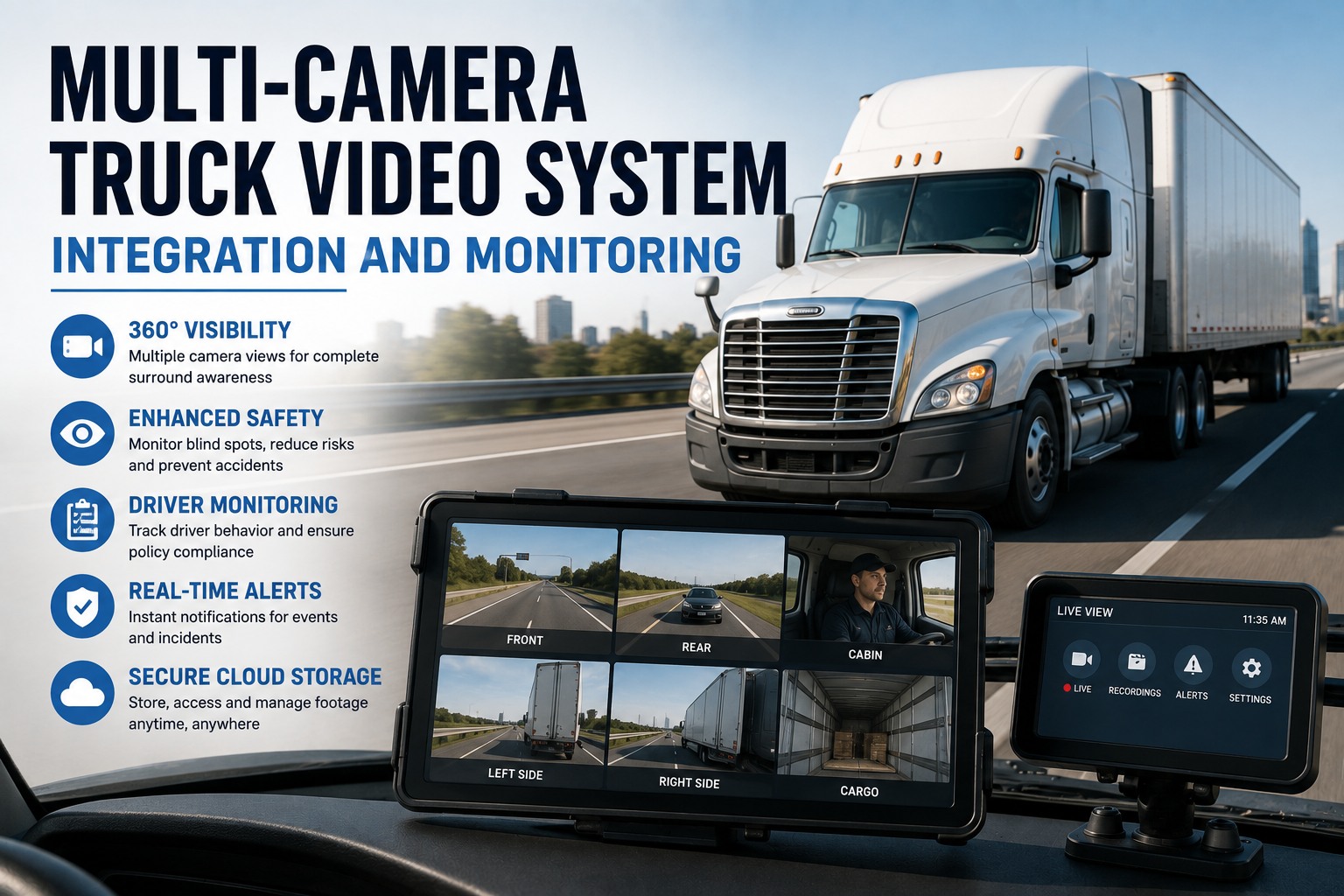
Multi-Camera Truck Video System Integration and Monitoring
One dash cam sees the road. A multi-camera system sees everything the road cam misses — both sides, the rear, the cab, the cargo — synchronized on one MDVR timeline and tied to each driver's safety record in Truck Inspection & Maintenance.
The Blind Zones a Road Cam Can't See
Every large vehicle carries blind zones that a forward camera simply cannot reach. They're where the expensive incidents happen — and where a fleet without coverage has no evidence when one does.
Where the Cameras Go
Multi-camera design starts with the truck's geometry, not the spec sheet. Each camera is placed to kill a specific blind zone — here's the coverage map for a full configuration.
The Camera Roster
Each angle answers a different question and defends against a different risk. A complete system layers them so no incident falls outside the frame.
Forward video that establishes fault in a collision — the evidence that exonerates a driver in a not-at-fault crash and defeats a staged-accident claim.
An in-cab AI camera watching for fatigue, distraction, and phone use — the only angle that shows what the driver was doing before an event.
Blind-spot cameras that can activate with the turn signal, covering the sides during lane changes, turns, and tight yard maneuvers where cyclists and cars vanish.
A rear view that can switch on automatically in reverse, guiding backing and dock alignment and capturing the low-speed impacts that rack up claims.
A camera inside the box or trailer that verifies how goods are loaded, proves delivery, and guards against cargo theft at unauthorized stops.
Every angle synchronized and tied to the driver and vehicle in one platform — the whole event, not one slice of it.
Start free →One Recorder, One Timeline
The magic isn't the cameras — it's the mobile DVR that binds them. Instead of scrubbing separate clips and guessing how they line up, every channel records to one synchronized timeline stamped with GPS and event data. Review an incident once and see all angles at the same instant.
Road, cab, side, rear, and cargo captured together, so playback shows the full event from every angle at once.
512GB to 2TB of SSD or SD storage holds roughly 7 to 30 days of footage depending on channels and hours.
Stream live or pull historical footage over cellular from a remote portal — no need to reach the vehicle.
Hard braking, a collision, or an AI alert auto-flags and uploads that clip, so key moments surface on their own.
Video That Lives With the Driver Record
Footage sitting on an SD card is just storage. Integrated with Truck Inspection & Maintenance, every camera event attaches to the driver and vehicle it belongs to — so a harsh-braking clip sits beside that driver's safety trend, an incident video attaches to the work order it caused, and review becomes coaching instead of a scavenger hunt across devices.
Configure to the Vehicle, Not a Catalog
Different trucks have different blind zones and different risks, so the right channel count follows the job. The systems scale — start with the essentials and expand as needs grow.
Road, driver-facing, rear cargo-door, and curb-view — built for frequent reversing, parking-lot disputes, and delivery proof.
Road, driver DMS, left and right blind-spot, tractor rear, and trailer cameras — full coverage for long-haul and lane-change risk.
360° external coverage around implements and blind spots, with rugged IP69K cameras and event context from work equipment.
What the System Delivers
Multi-camera video pays back on three fronts at once — fewer incidents, faster claims, and better drivers — which is why it's become the core of fleet safety upgrades.
Eliminating blind spots and coaching from real footage cuts the incidents that start where drivers can't see.
Synchronized video is the eyewitness that defeats false claims and settles disputes with hard evidence.
Interior views verify loading, prove delivery, and deter theft at unauthorized or unscheduled stops.
Behavior reports and clips turn vague safety talks into specific, evidence-based driver training.
Frequently Asked Questions
It depends on the vehicle's blind zones and the risks you're solving, which is why you configure to the truck rather than a catalog. A delivery or box truck typically runs a 4-channel setup — road, driver-facing, rear cargo-door, and a curb-view camera — built around frequent reversing and parking-lot disputes. A Class 8 tractor-trailer usually needs 6 to 8 channels: road, driver DMS, left and right blind-spot, tractor rear, and trailer views. Construction and refuse vehicles focus on 360° external coverage around implements. The systems are scalable, so many fleets start with road and driver cameras and add side, rear, and cargo views as needs grow. Start a free trial to plan your setup.
An MDVR — mobile digital video recorder — is the hub that makes multi-camera actually work. Rather than each camera saving its own separate, unsynchronized clip, the MDVR records every channel to a single timeline stamped with GPS and event data. That synchronization is the whole point: when you review an incident, you see the road, the cab, both sides, the rear, and the cargo at the same instant, instead of scrubbing separate files and guessing how they line up. A quality recorder also handles onboard storage, event triggers, remote health checks, and cellular retrieval, so it's the difference between a pile of footage and a usable evidence system. Ask how the timeline works.
Storage typically ranges from 512GB to 2TB of SSD or SD capacity, which holds roughly 7 to 30 days of continuous footage depending on how many channels are recording and how many hours the vehicle runs each day. For remote access, systems with 4G cellular connectivity let fleet managers live-stream any camera, play back historical video, and request downloads directly from the recorder over the internet — no need to physically reach the vehicle. Event-triggered clips, like a hard-braking or collision event, are automatically flagged and uploaded so the important moments surface without anyone hunting for them. Start free and review footage remotely.
That's exactly what integrating the camera system with Truck Inspection & Maintenance does, and it's what separates a usable safety program from a drawer of SD cards. Every camera event attaches to the specific driver and vehicle it belongs to, so a harsh-braking or distraction clip lands beside that driver's safety trend, an incident video attaches to the work order and repair it caused, and the whole history lives in one place. That turns raw footage into something actionable — evidence-based coaching instead of vague conversations, and a complete incident record instead of a manual hunt across devices. It also means video, telematics, inspections, and maintenance all describe the same event from one timeline. Start free and connect your video.
No — and any honest provider will say so. AI features can add configured driver or pedestrian alerts and flag unsafe behavior, but they don't replace mirrors, proper training, safe procedures, or a well-designed camera layout. The cameras are a powerful layer on top of good fundamentals, not a substitute for them: they eliminate blind zones a mirror can't fully cover, provide evidence a mirror never could, and surface behavior patterns for coaching, but a driver still needs the skills and habits that keep a truck safe. The right way to think about a multi-camera system is as the evidence and awareness layer that makes everything else more effective. Start free and build the safety layer.
Cover Every Angle, Review It in One Place
Truck Inspection & Maintenance brings your multi-camera video together — road, cab, sides, rear, and cargo on one synchronized MDVR timeline, tied to each driver and vehicle. Eliminate the blind spots where incidents start, hold the evidence that wins claims, protect the load, and turn footage into coaching that actually changes how your fleet drives.